
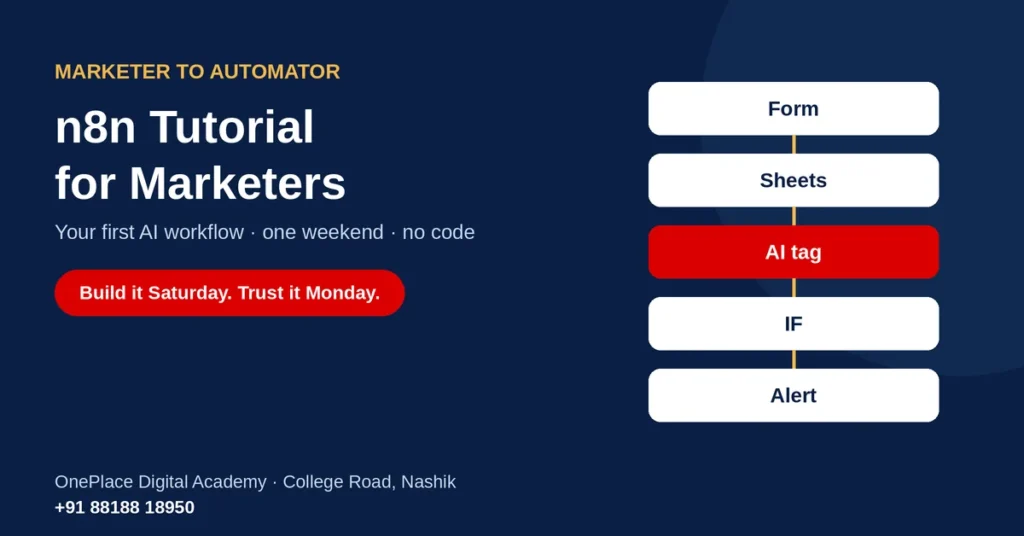
This n8n tutorial for marketers takes you from zero to one working automation in a single weekend, with no coding. You will build a lead-handling workflow: a new enquiry arrives, n8n saves it to Google Sheets, an AI step tags it as hot, warm or cold, and your sales team gets an instant alert. It takes about 6–8 hours spread over Saturday and Sunday. Below you get the setup choice, the exact nodes to use, a step-by-step build, a test checklist and five more workflows to copy once the first one runs.
It is written for people like Sneha, 27. She is a marketing executive at a manufacturing company in Satpur MIDC, Nashik. Every morning she downloads leads from Meta and the website form, pastes them into a sheet, decides who looks serious and forwards them on WhatsApp. That is an hour gone before her real work starts. She cannot quit her job to study, and she does not want to learn Python. She wants one thing to work by Monday.
The short version
- Pick one boring task. Choose something you repeat every day that follows the same steps. Lead handling is the best first project for most marketers.
- Start on n8n Cloud’s free trial. Self-hosting can wait until your workflow is worth keeping.
- Learn five nodes, not fifty. A trigger, Google Sheets, an AI model, an IF node and a message node cover most marketing workflows.
- Test with fake leads first. Run it ten times with test data before a real customer touches it.
- Add an error alert on day one. A silent failure is worse than no automation, because you stop checking.
Automate the task you already understand by hand. If you cannot write the steps on paper, n8n cannot run them for you.
What n8n is, in marketer language
n8n (say “n-eight-n”) is a visual workflow tool. You drag boxes called nodes onto a canvas and join them with lines. Each node does one job: catch a form entry, add a row to a sheet, ask an AI model a question, send an email. When something triggers the first node, data flows left to right through the rest. If you have used Zapier or Make, the idea is the same. The difference is that n8n gives you more control over AI steps and logic, and you can run it on your own server. Our n8n vs Zapier vs Make comparison covers when each tool wins.
| Term you will see | What it means | Marketing example |
|---|---|---|
| Workflow | The full chain of steps on one canvas | “New lead to sales alert” |
| Trigger node | The event that starts the workflow | A form is submitted, or it is 9 AM on Monday |
| Node | One action or app step | Add a row in Google Sheets |
| Credential | Your saved login for an app, stored once | Your Google account connection |
| Expression | A field that pulls data from an earlier step | Put the lead’s name into the email subject |
| Execution | One run of the workflow, with a full log | Lead #42 arrived at 10:14 and was tagged “hot” |
Cloud or self-hosted: which one to start with
You have two ways to run n8n. For a first weekend, the choice is simple: use the cloud trial and spend your time building, not configuring servers.
| Factor | n8n Cloud | Self-hosted (Community Edition) |
|---|---|---|
| Setup time | Sign up and start building in minutes | An hour or more with Docker or a VPS |
| Technical skill needed | None beyond using a browser | Basic server and command-line comfort |
| Billing | Free trial, then a paid monthly plan | Software is free; you pay for the server |
| Updates and uptime | Handled for you | Your job |
| Customer data location | On n8n’s cloud | On your own server |
| Best for | Learning and first workflows | Teams running many workflows every day |
Check n8n’s own pricing page for current plan limits before you commit. Plans change, and the trial is enough to finish this tutorial.
Before Saturday: your 30-minute prep list
Do this on Friday evening after work. It saves you an hour of hunting for passwords on Saturday.
- Write the task on paper. List every step you do by hand today, in order. “Open form inbox → copy name, phone, course → paste in sheet → judge interest → WhatsApp the sales lead.”
- Create a Google Sheet called “Leads – n8n” with columns: Date, Name, Phone, Email, Interest, Message, AI Tag, AI Reason.
- Get an AI key. Create an API key with OpenAI (or Google Gemini) and add a small usage limit so a mistake cannot run up a bill.
- Decide where alerts go. Email, Telegram or Slack are the easiest first choices. WhatsApp alerts need a WhatsApp Business Cloud API setup through Meta, so keep that for week two.
- Write 10 fake leads in a notepad: 3 serious, 4 maybe, 3 junk. You will use them to test.
Saturday: build your first workflow, step by step
The workflow you are building has five nodes: Form Trigger → Google Sheets → AI model → IF → Alert. Block 3 to 4 hours. Take a tea break after step 3.
Step 1: Create the workflow and add a trigger
Create a new workflow and name it “Lead to sales alert”. Add the n8n Form Trigger node and build a simple form with Name, Phone, Email, Interest (a dropdown of your services) and Message. n8n gives you a test URL and a production URL for the form. Later you can swap this trigger for a Webhook from your website form or the Facebook Lead Ads trigger, and the rest of the workflow stays the same.
Step 2: Save every lead to Google Sheets
Add a Google Sheets node with the “Append row” action. Connect your Google account as a credential, pick the “Leads – n8n” sheet, and map each column to the matching form field by dragging the field from the left panel. Add today’s date with an expression such as {{ $now.toFormat('dd-MM-yyyy') }}. Run the step once with a test entry and check that the row appears.
Step 3: Let AI tag the lead
Add an OpenAI node (or a Basic LLM Chain with your Gemini key). Ask it to return only a short, fixed answer so the next node can read it. A prompt that works:
You qualify leads for [company name], a [what you sell] business in Nashik. Read this enquiry and reply with exactly one word, HOT, WARM or COLD, then a pipe symbol, then one short reason. HOT means a clear need and a timeline. COLD means spam, a job seeker or no real need. Enquiry: Name {{name}}, Interest {{interest}}, Message {{message}}.
Keep the temperature low (around 0.2) so the answers stay consistent. Run it against your 10 fake leads and read every answer. If it tags a job seeker as HOT, add that example to the prompt.
Step 4: Split hot leads from the rest
Add an IF node. Set the condition to “AI output starts with HOT”. The true branch goes to an instant alert. The false branch can end there for now, because the lead is already in the sheet. Add a second Google Sheets node with the “Update row” action if you want the AI tag and reason written back to the sheet.
Step 5: Send the alert
On the true branch, add a Gmail, Telegram or Slack node. Write a message the sales person can act on in 5 seconds: “HOT lead: Rahul, wants a 2-day Meta Ads workshop for 12 staff this month. Call 98xxxxxx.” Pull each value in with expressions. Then switch the workflow to Active. From now on, it runs on its own every time someone submits the form.
Sunday: test it, break it, then trust it
Most first workflows fail in week one, and nobody notices because they stop checking. Spend Sunday morning making yours safe.
- Run all 10 fake leads through the live form. Every one should appear in the sheet, and only the serious ones should trigger an alert.
- Try to break it. Submit a blank message, a Marathi message, an emoji-only message and a very long one. Fix whatever fails.
- Build an error workflow. Create a tiny second workflow with the Error Trigger node that emails you the workflow name and error. Then set it as the error workflow in your main workflow’s settings.
- Read the Executions tab. Every run is logged with the data at each node. This is where you find out why something went wrong.
- Keep a manual backup for one week. Check the form inbox once a day as before. Stop only when the sheet matches it seven days in a row.
What changes on Monday: before and after
Here is how Sneha’s lead routine compares once the workflow is live. The times are her own estimates, so measure yours for a week to see the real gap.
| Task | By hand | With the n8n workflow |
|---|---|---|
| Copy leads into the sheet | 20–30 min every morning | Instant, on every submission |
| Decide who is serious | Gut feel, often delayed | AI tag plus a reason, checked by you |
| Alert the sales team | WhatsApp forward, when she remembers | Alert within a minute of the enquiry |
| Weekend and holiday leads | Wait until Monday | Logged and alerted as they arrive |
| Reporting | Rebuild the count every Friday | The sheet is always up to date |
5 more n8n workflows marketers can copy next
Once the lead workflow runs for two weeks without errors, add one new workflow per weekend. Each one below uses nodes you already know.
| Workflow | Trigger | Main nodes | Difficulty |
|---|---|---|---|
| Monday ad report | Schedule (Mon 9 AM) | Google Sheets or ad platform data → AI summary → Email | Easy |
| Blog to social drafts | RSS feed (new post) | AI writes LinkedIn and Instagram captions → Google Sheets for review | Easy |
| Review reply drafts | Schedule (daily) | New reviews from a sheet or API → AI drafts replies → Email for approval | Medium |
| Competitor watch | Schedule (weekly) | HTTP Request to a competitor page → compare with last week → Alert on change | Medium |
| Webinar follow-up | Form or Webhook | Google Sheets → Wait node → Personalised email series | Medium |
Keep a human approval step for anything a customer will read. AI drafts, you publish. If you want to go further and give the AI decisions of its own, read what agentic AI marketing means and then our step-by-step guide to building an AI marketing agent.
6 mistakes that waste a beginner’s weekend
- Automating a messy process. If your team handles leads three different ways, agree on one way first.
- Building the whole system at once. Ten nodes that work beat thirty that half-work. Ship the five-node version first.
- Testing on real customers. Use fake leads until the workflow passes every test on your list.
- Letting AI send messages unchecked. AI can invent offers, dates or prices. Keep it on tagging and drafting until you trust it.
- Ignoring data privacy. Phone numbers and emails are personal data. Share the sheet only with people who need it, and do not paste customer lists into public AI chats.
- Breaking company IT rules. Ask your manager or IT team before connecting company Google or CRM accounts. A five-minute conversation avoids a big problem.
How this skill fits a working professional’s career
Marketers who can automate their own reporting and lead flow free up hours every week for strategy, content and campaigns. That makes you the person your manager asks first when a new AI project comes up. If you are building skills around a full-time job, our guide on how to learn digital marketing while working full time shows how to plan the weeks, and the ChatGPT + Canva workflow post covers the content side. Curious how automation skills show up in pay? Do not trust random numbers online. Read our AI marketing salary guide for India and learn which questions to ask employers.
Where OnePlace fits
A weekend gets you one workflow. A structured course gets you a portfolio. At our College Road campus in Nashik, the n8n Automation Course runs for 8 weeks and has you build 8 real AI workflows covering leads, CRM, WhatsApp and campaign reporting. No coding is needed. For working professionals who want the full skill set, the PG Diploma in Digital Marketing (PGDDM) covers 11 months and 63+ modules, from SEO and Meta Ads to AI and automation. You can also compare both on our AI & Automation programs page. Ask about batch timings that suit your work hours on the demo call.
Fees are quoted on your free demo call. 0% EMI available. No hidden costs.
Frequently asked questions
Do I need coding to follow this n8n tutorial?
No. Every step uses the visual editor: you add nodes, connect accounts and map fields by dragging them. Simple expressions such as pulling a name into an email subject are copy-and-edit, not programming.
Is n8n free for marketers?
The self-hosted Community Edition is free software, though you pay for the server it runs on. n8n Cloud offers a free trial and then paid monthly plans. Check the n8n website for current plan limits before you choose.
Is n8n better than Zapier for marketing automation?
n8n gives you more control over AI steps, branching logic and where your data lives. Zapier is quicker for very simple two-app connections. Many teams start on one and move as their workflows grow.
Can n8n send WhatsApp messages to leads?
Yes, through the WhatsApp Business Cloud node, but it needs a Meta business setup, an approved number and approved message templates. Start with email or Telegram alerts and add WhatsApp once your first workflow is stable.
How long does it take to learn n8n while working full time?
Most marketers can build a first working automation in one weekend of 6 to 8 hours. Getting comfortable with AI nodes, error handling and multi-step workflows usually takes a few weeks of regular practice.
Is it safe to put customer data into an n8n workflow?
It can be, if you follow basic rules: limit who can open the sheet, use your company’s approved accounts, keep AI steps to tagging and drafting, and ask your IT team before connecting company systems.
Build your first workflow with us
Stuck on a node, or want to see a lead workflow running live before you build your own? Message us on WhatsApp and book a free PGDDM demo at our College Road campus in Nashik. Bring the task you want to automate, and we will sketch the workflow with you.
Or call +91 88188 18950. OnePlace Digital Academy, Soham Complex, Patil Lane No. 3, College Road (above Namco Bank), Nashik. Rated 5.0 on Google.